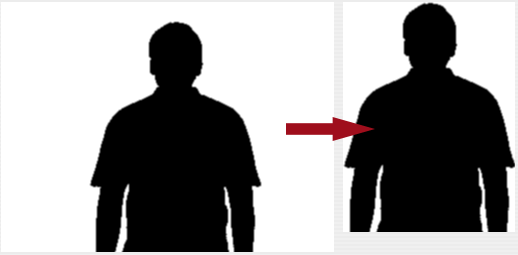
Trims a picture by removing area around it that consists of a specified color.
TrimPicture(
src as Picture,
trimColor as Color,
edgePixelCount as Integer,
progress as IProgressHandler) as Picture
src as Picture,
trimColor as Color,
edgePixelCount as Integer,
progress as IProgressHandler) as Picture
Parameters
- src
- The source picture to work with. This picture has to be 24 or 32 bits per pixel.
- trimColor
- The trim color.
- edgePixelCount
- The count of pixels from the actual image that should not be trimmed. (In the example above it was set to zero pixels)
- progress
- Use this parameter to use a progress class to get progress feedback from this function. This class must be a class that Implements the IProgressHandler Interface which is defined in this plugin.
Pass nil to this parameter if you don't need progress feedback.
Progress feedback will slow the filter down.
Returns
- Picture
- If the filter was successful: A reference to the modified picture.
If the src picture was not 24 or 32 bits then a nil will be returned.
If the trimmed destination was of zero height or width then nil is returned.
This filter will allocate memory so a Nil is also returned if not enough memory could be allocated for it or if the mask parameter contained invalid mask picture.
Remarks